This is the article the rest of the guide points to when it says “private by design”. It explains, plainly and then precisely, what Myne protects, how, and what it cannot protect you from.
What is encrypted
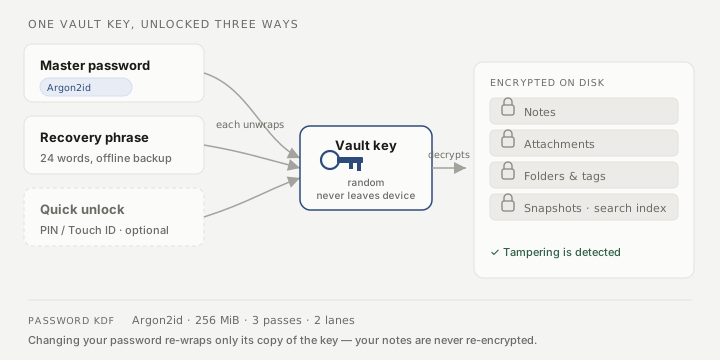
Everything in your vault that holds meaning is encrypted on disk: your notes and their full text, your attachments, your folder structure, your tags, your note snapshots, your preferences, and the search index. None of it is readable without your key. What is not hidden is coarse structure: that a vault exists, roughly how many items it holds, and how big they are. The limits below cover this.
How the encryption works
Your vault is protected by a single random key, generated when the vault is created and never sent anywhere. You never handle that key directly. Instead, separate credentials each unlock it:
- Your master password, run through a deliberately slow key-derivation function (Argon2id, tuned to use 256 MiB of memory, three passes, two lanes) so that guessing passwords is expensive.
- Your 24-word recovery phrase, an independent second key to the same vault.
- Quick unlock (optional), a PIN or macOS Touch ID that stores a third encrypted copy of the vault’s key in a device-local file. It is opt-in, never leaves the device, and is never part of a backup. The master password stays the primary credential — quick unlock only lets you re-enter after auto-lock, and with a PIN the full password is still required after the app restarts (a configured Touch ID credential, guarded by the operating system’s biometric prompt, can be used on a cold start). See Quick unlock.
Any one of these decrypts the vault’s key, and with the key Myne decrypts your notes. Because each is an independent wrap of the same key, changing your password re-wraps only that one copy: your notes are never re-encrypted and your phrase keeps working. The encryption itself uses a modern authenticated cipher, so a tampered file is detected rather than silently accepted.
Where your notes live
Myne makes no network connection you did not ask for: no background connection, no analytics, no telemetry. Two settings, both off until you turn them on, can move data off this device, and nothing else does.
Sync is one. When you turn it on, Myne stays zero-knowledge: only encrypted blobs leave your device, the server can never read your notes, and you can point Myne at a server you host yourself instead of the hosted one. Either way Myne-the-company never sees your notes — the only thing sync changes is that ciphertext is stored and relayed between your devices, never decrypted off them. The app still sends no telemetry, synced or not.
A remote AI provider is the other. Myne’s AI features are off until you opt in, and even then nothing is sent anywhere until you name a provider. Naming a model that runs on this computer keeps your notes here. Naming a remote service does not: the text of whatever you ask it about leaves this device readable, to a company Myne does not run. Myne asks first, on a screen that states what is sent and to whom, and it can tell you that much — it cannot tell you what the provider keeps, for how long, or whether it passes the request on. See Where your AI runs and AI privacy and limits.
Until you turn on sync or name a remote AI provider, Myne runs entirely on your device; nothing leaves it.
There is also no email at sign-up and no email recovery. This is deliberate, not a missing feature. An email reset would mean someone other than you could trigger access to your vault, which is exactly the power Myne refuses to hold. The flip side is that you hold the only keys; the operational walkthrough for a forgotten password is If you forget your password.
What we cannot protect you from
Encryption protects your notes at rest. It does not make the following go away, and it would be dishonest to imply otherwise:
- Backups outlive deletions and password changes. An old password opens old backups. The recovery phrase opens every backup of the vault, forever. Restoring resurrects permanently-deleted notes. A backup is a copy frozen in time, with all that implies. See Back up your vault.
- Software running on your device can read an open vault. While a vault is unlocked, its contents are decrypted in memory. Malware or another program with access to your running session can read what you can read; Myne’s encryption guards the disk, not a compromised machine.
- An unlocked vault on a grabbed device is open. Auto-lock narrows the window in which an unattended, unlocked vault sits exposed, but if someone takes your device while you are using it, the vault is already open. Lock it yourself when you step away.
- Sync still shows the server that you are there. The server sees when you sync, how many encrypted blobs you push and how large they are, and how many devices you have. Myne can route that traffic through Tor, which changes where the connection appears to come from — it does not change what the connection reveals. See Routing sync through Tor.
- A provider you name receives what you send it. If you name a remote AI provider, the text you ask it about is in that company’s hands. No encryption Myne applies reaches across that line, because the request has to arrive readable to be answered. An AI run sends more than the note in front of you: it opens by telling the provider the title and the identifier of every note in the scope you approved, before it has read any of them, and when that scope is a single note it sends that note’s text as well. Those identifiers do not change between runs, so a provider that keeps its requests can tell that two of them came from the same notes. Myne reports on the run itself roughly how many characters of your own writing left the device.
- A fake site asks you for your recovery phrase. In a browser, Myne asks for your 24 words in exactly one place: an unlock with recovery phrase that you started yourself, after forgetting your password. It never asks for them to sign you in, and never asks for them to add a device. That one rule is the whole defence, and it is worth learning, because anyone holding those words and your account number can open your vault from anywhere and keep opening it: the phrase does not change when you change your password, and there is no way to revoke it. Check the address before you type them, and if a link in a message or an email brought you to the page, do not type them at all. An app on your own machine cannot be impersonated by a web address, so the desktop and phone apps do not have this problem.
- A browser extension can read what is on the page. An extension you have given access to a site reads everything that site shows and everything you type into it: your recovery phrase while it is on screen, the words you type while unlocking with it, and your master password every time you unlock. That is how extensions work, no setting in Myne changes it, and the page cannot detect it. If you are not sure about every extension in that browser profile, create your account and do any recovery in the desktop or phone app, or use a clean profile for those steps.
There is also coarse information a copy of your vault folder reveals even though the contents stay sealed: that the vault exists, how many vaults you have and when each was last opened, the sizes of the encrypted items, how often snapshots are taken, the key-derivation settings, and whether quick unlock is set up on this device (its small device-local file is present). Your titles, text, tags, folders, and the times you wrote are never among it. In particular: an attachment’s name, contents, and type are encrypted; what a copy of the vault folder can still reveal is how many attachments there are and how big each one is.
If you keep more than one vault, the picker shown before unlock names each vault this device has unlocked before, from a sealed device-local copy of that name whose key sits in your system keychain. That happens on macOS and iOS; elsewhere there is no keychain to hold the key yet, so no name is stored and every row stays neutral. It never syncs and is never part of a backup, and a Privacy setting destroys the copies stored here and stops new ones being written. See Vault names on the lock screen.
If you use the PIN form of quick unlock, that device-local file is a third encrypted copy of the vault’s key, and someone who copies it can try to guess the PIN offline. The only thing standing in the way is the PIN’s length and the same deliberately slow key-derivation step — so the PIN path is weaker than the Touch ID path, which binds its copy to this device’s hardware. See Quick unlock.
The full, precise catalogue of what Myne defends against and what it doesn’t is in Myne’s public threat model, and this article is the plain-language projection of it.
Limits
This page describes the protection Myne provides today. Where a sibling article needs the technical detail (backups, the recovery flow, auto-lock) it links back here so the model is described in one place.