Quick unlock lets you re-enter a vault after it auto-locks with a short PIN, or with macOS Touch ID, instead of retyping the full master password. It is a convenience layered over the already-encrypted vault: it is device-local, off by default, and with a PIN your master password is still required after the app restarts. A configured Touch ID credential is the one exception — guarded by macOS’s own biometric prompt, it can be redeemed on a cold start. This article covers turning it on, using it, what wipes it, and where its limits are.
Turning on quick unlock
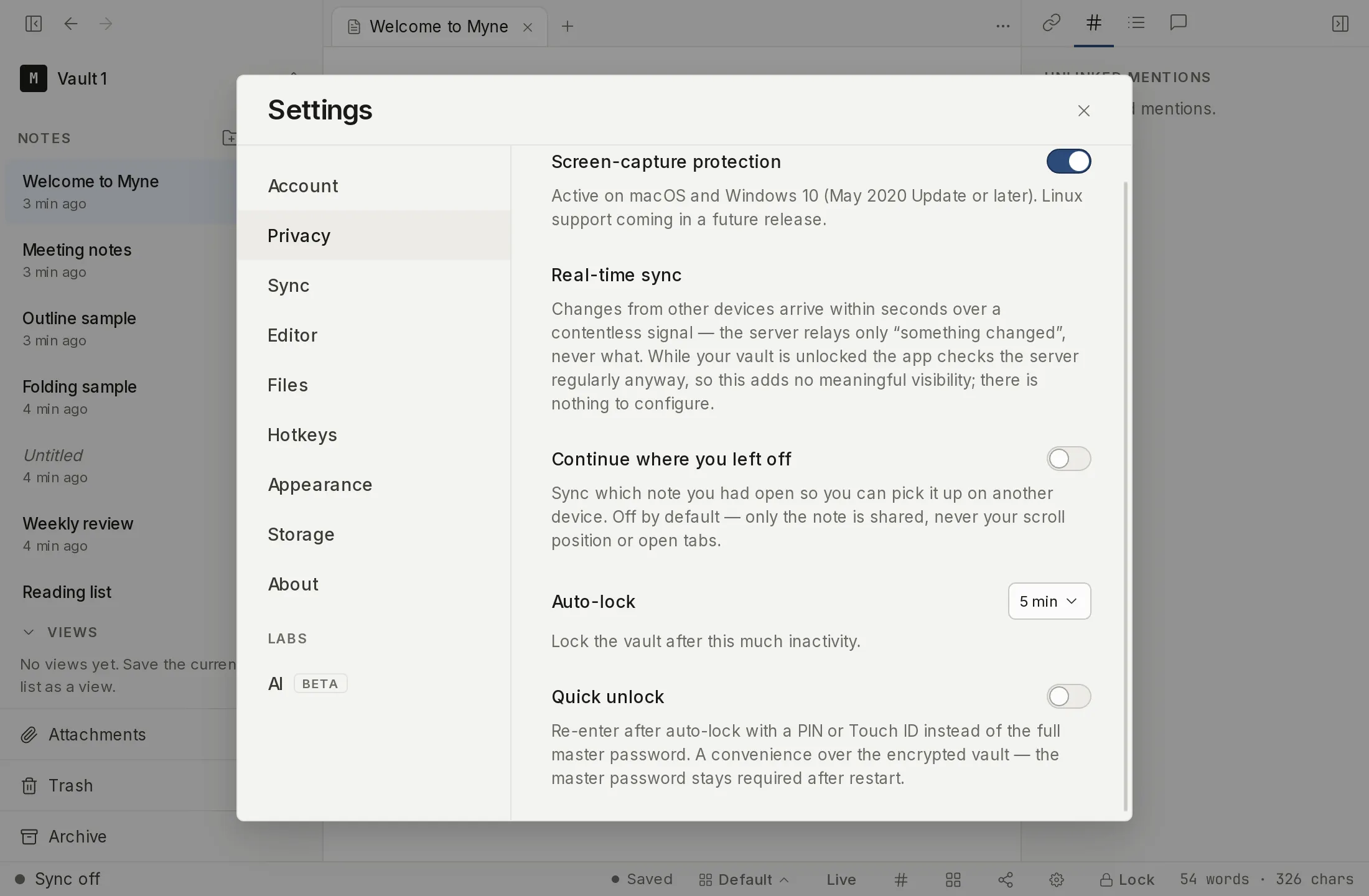
Quick unlock is opt-in and off by default. You set it up per device, while the vault is unlocked, from Settings → Privacy → Quick unlock, the control below Screen-capture protection and Auto-lock.
The helper text under the toggle states the trade plainly, and it distinguishes the two paths: “Re-enter after auto-lock with a PIN or Touch ID instead of the full master password. A convenience over the encrypted vault: with a PIN the master password is required again after a restart; Touch ID covers a restart too, until the fingerprints enrolled on this device change.”
Switch it on and a PIN field appears, with two buttons:
- Set PIN stores a PIN. The PIN must be at least 6 digits and digits only — the Set PIN button stays disabled until what you type meets that floor.
- Use Touch ID binds quick unlock to this Mac’s Touch ID instead of a PIN.
A note next to those buttons is honest about which path is which: “Touch ID is macOS-only and currently experimental (pending hardware verification). PIN works everywhere.” Treat the PIN as the path Myne stands behind today; see the limits below for what “experimental” means here.
Touch ID is offered only where it can actually work. On Windows and Linux the button is not shown at all. On a Mac, if enrolling fails Myne says why — “Touch ID isn’t available in this build. It needs a signed macOS build with Touch ID enrolled.” — and then hides the button for the rest of the session, because trying again cannot succeed until the build is signed. If you see that message, use a PIN.
Once it is configured, the row’s own toggle is the off switch. Flip it back off and Myne wipes the quick-unlock credential from this device; you then unlock with your master password as before.
Each device opts in separately, and so does each vault — setting up quick unlock for one vault leaves your other vaults on the same computer untouched. The credential never syncs, and the Touch ID variant is bound to that one machine’s hardware; it does not travel to another computer even if you later sync your vault.
Re-entering after auto-lock
When auto-lock closes a vault during a running session and quick unlock is redeemable, the Unlock screen leads with the quick-unlock affordance — a PIN field with Unlock with PIN, or an Unlock with Touch ID button — and shows one credential at a time rather than stacking both.
Quick unlock never replaces the password path. A Use password instead link switches to the master-password form, and an Unlock with PIN instead link switches back, so neither side is a dead end and you can always type your password.
If a PIN is wrong, the screen tells you how many tries remain — “Incorrect.
On a fresh app start, a configured PIN hides itself until one full master-password unlock has happened in this session. So after you launch the app cold, you use the password form, and the PIN becomes available only once the vault has been opened with the master password at least once that session. A configured Touch ID credential is not gated this way: because macOS’s own biometric prompt already guards it, it can be used on a cold start.
What invalidates quick unlock
Quick unlock is wiped, and you fall back to the master password, when any of these happen:
- You change your master password.
- You unlock with your recovery phrase and set a new password. Recovering is a password reset, so it clears the quick-unlock credential for the same reason a password change does.
- You delete the vault.
- A PIN is entered wrong 5 times in a row. After the fifth consecutive wrong attempt the credential is wiped — a successful unlock resets the count before then.
- For Touch ID, the enrolled set of fingerprints changes at the operating-system level.
After any of these, quick unlock is simply gone until you set it up again from Settings. Nothing about your vault, your notes, or your recovery phrase is affected — only the convenience credential on this device.
Limits
Quick unlock is a convenience gate over a vault that is already encrypted. It does not change Myne’s zero-knowledge root: your master password stays the primary credential, and the quick-unlock credential only wraps a third copy of the vault key. Turning quick unlock on does not weaken the encryption of your notes, and turning it off does not strengthen it.
It does not defend against software already running on your device. Like the rest of Myne’s protection, it guards the encrypted files at rest, not a compromised machine; a program with access to your running session can read an unlocked vault regardless of how you re-entered it.
The PIN path has a specific, honest bound. The 5-attempt cap only limits an attacker typing at your keyboard. It does not limit an attacker who copies the PIN credential’s file off your device: that copy can be guessed offline as fast as their hardware allows, bounded only by Argon2id’s cost and the entropy of your PIN. A 6-digit PIN is short; choose a longer one if this matters to you, and do not treat the PIN as equivalent in strength to your master password.
The Touch ID path is experimental and hardware-unverified — its own setup note calls it “experimental (pending hardware verification)”. It is offered so you can try it, not as a verified security boundary; until that verification lands, rely on the PIN as the path Myne stands behind, and on your master password as the credential that always works.
It also needs a signed macOS build. Myne’s own installers are not code-signed today, so on a build you fetched from the releases page, enrolling Touch ID fails with the message above and the button disappears for the session. That is the app telling you the truth rather than a fault you can retry your way out of.
Shortcuts
| Action | macOS | Windows / Linux |
|---|---|---|
| Open Settings | ⌘, | Ctrl , |