Sync is built so the server can store and relay your notes without ever being able to read them. Every note is encrypted on your device before it is uploaded, using keys derived from your password (or recovery phrase). The server never holds those keys, so to it your notes are opaque blobs. This page explains that model in plain terms and, just as importantly, where it stops.
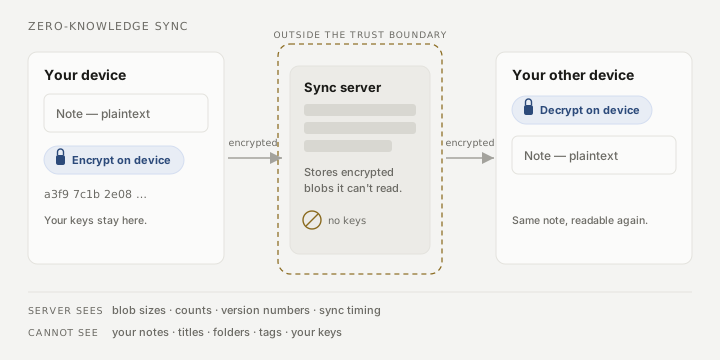
Your keys never leave your device
When you unlock your vault, your password (or recovery phrase) derives the keys that encrypt and decrypt your notes. Those keys stay on your device. What travels to the server is ciphertext plus a small amount of routing metadata. Because the server never has the keys, it cannot decrypt a note, a title, a folder name, or a tag — all of that lives inside the encrypted blob.
This is what “zero-knowledge” means here: the server can hold your data and hand it to your other devices, but it cannot read it. It is a property of the math, not a promise about the operator’s good behaviour.
A large vault does not travel in one go. Myne sends and fetches in bounded batches and records what has landed before sending the next, so a first sync of thousands of notes progresses over several passes rather than restarting from the beginning each time. Progress is shown as a count of notes, not an estimate — see Reading sync status.
Hosted and self-hosted are the same trust model
Myne’s hosted server and a server you run yourself sit in the same position: outside the trust boundary. Self-hosting changes who operates the server, not what the protocol lets the server do. Either way, Myne assumes the server could be curious or compelled, and encrypts accordingly. Running your own server is a fine choice for control and availability, but it is not what protects your note content — the client-side encryption is.
What the server sees, and cannot
The server can see:
- Encrypted note and attachment blobs, and their sizes and counts.
- A hashed form of your account number (not the number itself in a reusable way, and never your password).
- Opaque per-note version counters it uses to order changes and detect conflicts — numbers, not your text.
- How many devices are on the account, and the timing of each device’s pushes and pulls over time.
- The current connection IP for the duration of a connection. Myne’s design does not persistently log IPs, but the connection itself is visible while it happens.
The server cannot:
- Read your note content, titles, folders, or tags.
- Derive your keys, password, or recovery phrase.
- Forge a note or a valid vault-head record — it lacks the keys to do so.
Guarding against a dishonest server
Encryption stops the server from reading or forging content, but a dishonest server could still try to serve authentic-but-wrong data: replay an old version, quietly withhold the newest one, or show two of your devices divergent histories. Myne carries a small authenticated record (a “vault head”) that lets your devices catch some of this — for example, an attempt to roll your own edits backward. When a device rejects data on these grounds, it raises an honest integrity alert rather than accepting it silently (see Reading sync status).
Limits
The protections above are real but bounded, and Myne states the bounds rather than overselling them:
- This is not anonymity. The connection metadata listed above (device count, blob sizes, push/pull timing, current IP) is visible to the operator. Zero-knowledge covers your content, not the fact or shape of your usage.
- A brand-new device cannot verify its own history. The first time a fresh or reset device connects, it has nothing to compare against, so it cannot detect a rollback or fork on that first sync. The defence is the out-of-band verification code you compare when you add a device.
- Withholding is only partly detectable. Myne can catch a server hiding your own device’s latest work, but it cannot in general distinguish “nothing new exists” from “the newest update is being withheld.” Do not read the integrity checks as general tamper-proofing.
- No forward secrecy. Removing a device revokes its ability to sync; it does not cryptographically claw back what that device already holds, and it is not a remote wipe. See Managing devices.
- Shared singletons and rebuildable caches are handled separately. Some vault-wide data (your preferences, for instance) is not covered by the per-note integrity record; a rollback of it falls under the same bounded “local prefs replay” limit described in How Myne protects your notes.
These are the same guarantees documented in Myne’s threat model; the user guide does not claim more than they cover.